Home / Tips
Tips
We March as One tips from the store text
Sources checked Steam appdetails and the English store page for We March as One, checked 12 Nov 2026. No launch client and no demo session were played.
These tips restate the store. They are not a playtest. On 12 Nov 2026 the full game was still coming soon for Nov 13, 2026.
Paint troops however you like, then position them to counter the enemy. That is the only placement advice Steam printed.
Gold is earned from defeated enemies whether you win or lose, and fallen troops return, so the store describes a loss as something you keep building from.
Isometric, top-down, and fly-through are the three view modes. There is no published best camera, best unit, or redeem code.
A tip on this site is a sentence Steam already printed, read once, for someone who wants the loop before Nov 13, 2026. It is not a ranked opening, a formation, or a code. The guide has the fact table. Units and Progression hold the lines these tips point at.
Place the army before the fight
The paint heading is two bullets. You paint troops directly onto the battlefield however you like. You tactically position them to counter the enemy force.
The useful reading is small. The decision the store names happens before the battle, by painting and by position, not by a mid-fight order list. It does not say which position counters which force. Units stops at the same line. Store screenshots show a brush-size control next to Undo and Clear on the preparation screen. That is a label in the frame, not a brush tutorial.
Let a loss count
You earn gold from defeated enemies whether you win or lose. Fallen troops return for the next battle, so you keep the army you have built.
Taken together, the store describes the loop as cumulative. A lost battle is not written as a reset. No gold amount is printed, so this is not advice to farm a particular fight. The absence of a number is covered on Progression.
Do not wait on a roster this site does not have
New unit types come from a branching skill tree. Until dux publishes the nodes, a “level these first” tip would be made up. Skip it. Recruit more troops, unlock from that tree, and return with a stronger army is the whole published upgrade path.
Change the view when the field is too dense to read
The store names three camera modes: isometric, top-down, or fly-through. It calls them multiple ways to view the action. It does not rank them.
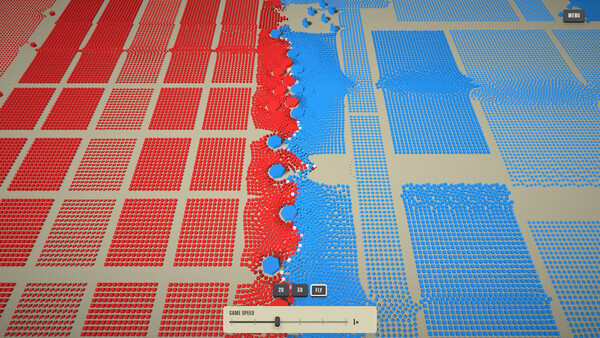
Screenshots include a flat top-down preparation view, a very close contact view, and a slightly angled view of two huge formations. Those are pictures of scale, which matches the “tens of thousands” line and the individual-simulation line. They are not a camera manual. Several battle frames show a control labeled Game Speed. The about text never mentions speed, so this page will not tell you which setting to use.
Use the sandbox heading for experiments
Sandbox mode lists a level editor and experiments with unusual army compositions across different battlefield layouts. That is the store’s invitation to try a layout that a level did not hand you. It is not a puzzle solution, and no editor control is named. One screenshot is a river splitting groups of trees and buildings. Another is an open beige field. Both are store images of layouts, not a catalog.
Match the PC to the only spec Steam printed
Every soldier and projectile is individually simulated, and the army is described as tens of thousands strong. The only hardware block next to that claim is the Windows minimum on the guide: Windows 10 64-bit (21H1 or newer), a quad-core CPU in the i5-6400 or Ryzen 3 1200 class, 8 GB RAM, a DirectX 11 GPU with 1 GB VRAM, and 2 GB of disk. There was no recommended block. This site has not measured frame rate.
Do not look for a code
No redeem list was on the store page, in appdetails, or in Steam news, which returned no posts. This guide has no codes page. Spending time on a code list is time the sources do not support.
The support email on the store is playwemarchasone@gmail.com. That is dux’s address as printed. It is not this wiki’s inbox, and it is not a code channel this site knows about.
Sources and last check
Steam appdetails and the English store page for We March as One, checked 12 Nov 2026. No launch client and no demo session were played. Where a number comes from a patch post and this site has not confirmed it in a current client, the page says so.